Live Clipping
Connect any live stream — RTMP, SRT or HLS — and start clipping key moments before the broadcast even ends. MediaCopilot gives your team the fastest time-to-publish in the industry, turning live signals into ready-to-post clips in seconds.
Clip Live, Publish First
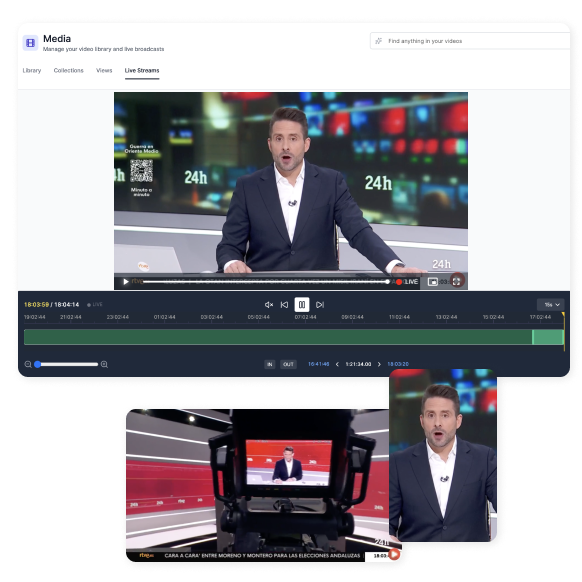
No more waiting for a recording to finish. With Live Clipping you watch the stream in real time, mark the moments that matter — manually or with AI assistance — and export platform-ready clips with subtitles, reframing and metadata already applied.
Whether you're covering breaking news, a live sports match, or a corporate event, Live Clipping collapses the gap between "it happened" and "it's published" to just a few clicks.


Key Capabilities
Everything you need to go from live signal to published clip in record time.
Connect any live source via RTMP, SRT or HLS. Paste a URL and you're streaming inside MediaCopilot in seconds.
Set clip boundaries on the fly while the stream is running. Keyboard shortcuts and one-click controls make marking effortless.
Let the AI detect scene changes, applause, goals, or topic shifts and suggest cut points automatically as the stream progresses.
Every clip gets automatic speech-to-text and burned-in or sidecar subtitles — ready for silent autoplay on social feeds.
Export the same clip in 16:9, 9:16, 1:1 or 4:5 with AI-driven subject tracking — no manual cropping required.
Scrub through the buffered timeline, review past moments, and clip retroactively — even while the stream continues.
Queue multiple clips for batch export or one-click publishing to YouTube, Instagram, TikTok, X, or your CMS.
AI-generated titles, descriptions, tags and thumbnails are attached to every clip for instant discoverability.
How It Works
From live signal to published clip in five steps.
Paste an RTMP, SRT or HLS URL. MediaCopilot starts ingesting the stream immediately — no transcoding delays.
Monitor the live feed in-browser. Set mark-in and mark-out points manually or let the AI suggest cuts based on content analysis.
Transcription, subtitles, reframing and metadata are applied automatically — clips are platform-ready the moment you cut them.
Trim edges, adjust subtitles, pick the right aspect ratio, or translate — all without leaving the live session.
Send clips straight to social media, your CMS, or a shared drive. Your audience sees highlights while the event is still live.
Why Teams Choose Live Clipping
Who Benefits from Live Clipping?
Any team that needs to turn a live signal into published content — fast.
Clip goals, saves, fouls and celebrations while the match is still running. Publish highlights to social media before the half-time whistle.
Cut soundbites and key statements from press conferences, live reports, or rolling coverage and push them to digital channels instantly.
Create shareable keynote snippets, panel highlights and audience reactions during the event — keeping your social feeds active in real time.
Capture epic plays, funny moments, and clutch victories from Twitch, YouTube Live or tournament feeds and post them while viewers are still engaged.
Share sermon highlights, worship moments and community announcements with your congregation before they leave the building.
Distribute executive quotes, product demos, and Q&A highlights to internal channels while the meeting is still in session.
All MediaCopilot Tools
Frequently Asked Questions
MediaCopilot Blog
Stay ahead with our latest insights, news and releases.