Speech-to-text in MediaCopilot

MediaCopilot’s Speech-to-text tool makes converting video and audio files into accurate, searchable text effortless. Powered by advanced AI, it delivers over 95% accuracy in multiple languages, helping teams repurpose content, improve accessibility, and streamline workflows.

MediaCopilot Your Transcription Tool

MediaCopilot’s Speech-to-Text Transcription Tool uses advanced AI to quickly convert video and audio into accurate, searchable text in multiple languages. It helps teams repurpose content, create subtitles, meet accessibility standards, and manage large media volumes with ease.

Perfect for marketing, eLearning, HR, and global enterprises, it streamlines workflows, cuts costs, and turns video into scalable, ready-to-use text that drives communication and value.

Discover more

Functions

Automatic Transcription

Convert video and audio into accurate, time-synced text with AI, reducing manual work and speeding up production.

Speaker Identification

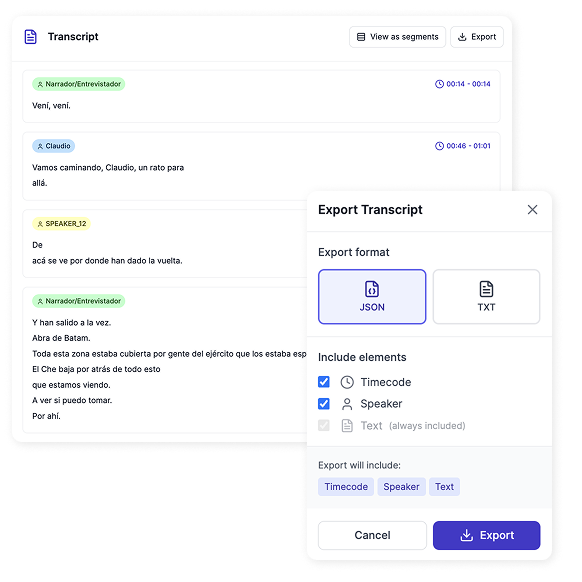
Detect and label different speakers automatically, making transcripts more organized and readable.

Multilingual Transcription and Translation

Transcribe and translate content into 50+ languages, creating a foundation for global content accessibility.

Subtitle File Generation

Export ready-to-use subtitle files in formats like SRT, VTT, and STL for publishing on any platform.

Searchable and Indexed Transcripts

Make videos searchable by automatically indexing words and scenes, enabling quick content discovery.

Metadata Enrichment

Automatically generate metadata from video content to categorize and tag files for easy organization.


Transcript Video to Text: How it Works

With MediaCopilot, turning your videos into accurate, editable text is simple and fast: generate precise transcripts in multiple languages, make content searchable, and streamline your workflow—all without hours of manual work.

Quick Steps to Get Started:

  1. Sign up for your account: Register with your name, company, and email to start a free trial or select a plan that fits your needs.
  2. Upload videos or connect your library: Import files from your device or integrate cloud storage for instant access.
  3. Let AI handle transcription: In minutes, get perfectly synced transcripts and translations ready for review.
  4. Edit and refine: Adjust formatting, speaker labels, and language settings to ensure accuracy and brand alignment.
  5. Export or share instantly: Download text files, subtitle formats, or integrate directly with platforms for seamless publishing.
Watch It in Action


Benefits of Speech-to-Text

  • Accurate, AI-Powered Transcripts
  • Time and Cost Savings Over Manual Transcription
  • Scalable for Large Video Libraries
  • Multilingual Transcription and Translation
  • Searchable, Indexed Content for Easy Access
  • Subtitle-Ready Text Export
  • Seamless Integration With Enterprise Tools
  • Enhanced Accessibility and Compliance
  • Streamlined Content Repurposing
  • Better ROI Through Automation

Video to Text Converter: How it’s for

Marketing

Transcribe webinars, presentations, and product launches into clear, searchable text to expand reach, create subtitles, and cut localization costs.

Human Resources (HR)

Turn training sessions and onboarding materials into accurate transcripts, ensuring consistency and saving time on manual documentation.

eLearning

Quickly generate transcripts for courses and training materials, making educational content easier to update, translate, and scale.

Banking and Finance

Produce precise, compliant transcripts to communicate securely across regions and maintain a consistent voice.

Social Media

Repurpose video content with accurate transcripts to create captions, blogs, and social posts that boost engagement.

Other Industries

  • Legal & Compliance: Generate transcripts for hearings, contracts, and training to ensure documentation accuracy.
  • Retail & eCommerce: Create searchable transcripts for product videos and promotional campaigns to increase visibility.
  • Consulting & Professional Services: Turn client webinars and talks into polished text resources to strengthen thought leadership.
Unlock AI Power


All MediaCopilot Tools


FAQs

How accurate are the AI-generated transcripts?

With over 95% accuracy in major languages, MediaCopilot delivers highly reliable transcripts that reduce the need for manual corrections and editing.

Can I export transcripts in different formats?

Yes! You can download transcripts as text files or subtitle formats like SRT, VTT, and STL for easy use across platforms.

Does it support multilingual transcription and translation?

Absolutely. MediaCopilot can transcribe and translate videos into 50+ languages, making global communication faster and more accessible.

How secure is my video content?

All content is processed with enterprise-grade security, ensuring that sensitive materials remain private and protected.

How does pricing work for transcription?

MediaCopilot charges based on input hours: for example, a 30-minute video consumes 30 minutes of processing under your plan. If you add additional services like translation or dubbing, the time consumed corresponds accordingly. This model ensures transparent and scalable pricing.

Is MediaCopilot easy to use for non-technical teams?

Absolutely. MediaCopilot handles your media assets directly in the cloud, producing auto-transcripts, subtitles, and other output in seconds. The interface allows you to review and personalize results—like adjusting subtitles or tweaking highlights—then export or publish with a single click.

Try it now

Ready to Get Started?

It’s time to supercharge your media production and let AI free you from the grind. Try MediaCopilot for free and see the difference on your very first project. You’ll wonder how you ever worked without your AI copilot!