This process can be done in two ways:
- Manually: You can clip videos using traditional editing software, where the user must review the entire recording and manually trim the beginning and end of the desired segment. This method works, but it becomes slow and inefficient when dealing with long videos or multiple clips, since every cut depends on manual effort.
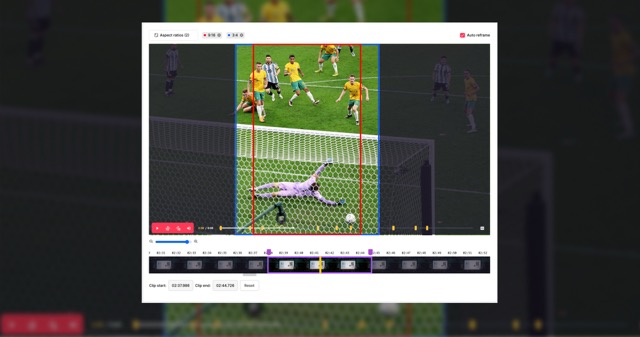
- Automatically: At MediaCopilot, we automate this entire process with AI. Our system analyzes your video to detect key moments, important quotes, relevant actions, or visual changes. We automatically identify the most valuable segments and generate ready-to-use clips within seconds. This allows you to get consistent, high-quality results without having to review or trim each clip manually.
In both cases, the result is an independent clip that is ready to share.
Key Aspects of Video Clipping
Below are the most important elements that define this process:
1. Creating Short Videos from Long Videos
The main purpose of a video clipping tool is to generate shorter, more focused, and visually appealing versions of long videos. This allows long-form content to be transformed into easy-to-consume pieces, especially useful for social media platforms, quick highlights, or extracting only the most relevant and engaging moments from the original footage.
2. Highlighting Important Moments
Clipping is ideal for content such as:
- Podcasts: podcasts often contain long conversations filled with unique insights, jokes, reactions, or memorable lines. Clipping allows you to extract these standout moments and turn them into short, shareable pieces perfect for social media.
- Long interviews: extended interviews include detailed answers and meaningful exchanges, but not every part is equally engaging. By clipping key responses or emotional moments, you create highlights that attract viewers and encourage them to watch the full interview.
- Livestreams: Livestreams usually run for hours and include a mix of exciting, slow, and unpredictable segments. A clipping tool helps isolate the best moments—funny reactions, important announcements, game highlights—so audiences can enjoy the best parts without watching the entire stream.
- Events: Events such as conferences, product launches, or panels often feature multiple speakers and topics. Clipping specific segments allows you to showcase essential moments, announcements, or quotes quickly and effectively.
- Corporate videos: Corporate recordings often contain valuable fragments like testimonials, presentations, or training moments. Extracting shorter clips helps companies repurpose content for marketing, internal communications, or onboarding materials.
- Webinars: Webinars are typically dense and educational, making short clips extremely useful. Clipping lets you highlight key explanations, answers to questions, or important insights that can be reused for training, promotions, or knowledge-sharing.
For example, from a 1-hour video, you can extract several interesting, funny, or viral moments that can then be shared on TikTok, Reels, or YouTube Shorts.
3. Everyday Examples of Video Clipping
Some very clear examples include:
- sports highlights
- standout moments from interviews or podcasts
- movie trailers or promotional teasers
- short clips for social media campaigns
- compilations from livestreams, conferences, or classes
These examples illustrate how a video clipping tool turns long content into more accessible and engaging pieces.
4. Adding Enhancements to the Final Clip
Many creators don’t just cut out a portion of the video, they elevate the clip by adding elements that make it stand out. This often includes:
- subtitles to improve accessibility and retention
- smooth transitions for more polished storytelling
- automatic zoom adjustments for vertical formats like Reels or TikTok
- text overlays, effects, or stickers to increase engagement
- color and audio enhancements that give the clip a clean, professional finish
At MediaCopilot, we automate much of this process with AI. Our system not only identifies the best moments but also prepares them for social platforms with smart formatting, dynamic reframing, and optional enhancements. This helps your clips perform better, look more professional, and capture attention instantly—all without the manual editing work.
5. Monetization Through Clipping
More and more people work professionally as clippers:
- They edit and extract content for creators, brands, and media outlets.
- They earn revenue based on productivity or video views.
Clipping has become a recognized profession thanks to the growing demand for short-form content.
6. Technical Definition of Clipping in Video and Audio
It’s important to clarify that, in a technical context, clipping can also refer to a problem where:
- the brightness or audio signal exceeds the device’s recording capacity
- detail is lost
- distortion or “blown-out” areas appear in the image or audio
Although they share the same name, this technical concept is different from creative video clipping.
Why Use a Video Clipping Tool?
A clipping tool is useful because:
- it drastically speeds up content creation, allowing you to turn long recordings into polished, shareable clips in minutes instead of hours.
- it lets you extract dozens of clips from a single long video, maximizing the value of every recording and giving you a steady flow of content.
- it simplifies daily posting on social media, making it easy to keep a consistent presence across platforms like TikTok, YouTube, and Instagram.
- it helps keep content relevant, allowing you to quickly isolate trending moments, reactions, or key highlights that resonate with your audience.
- it improves repurposing strategies, transforming old or long-form content into fresh, digestible pieces that can reach new viewers.
- it reduces manual editing time, freeing creators and teams to focus on storytelling, strategy, and creative impact instead of repetitive cutting tasks.
Conclusion
A video clipping tool is the perfect solution for anyone who needs to transform long videos into short, impactful, and shareable clips. Whether your goal is to highlight key moments, create content for social media, prepare summaries, or improve the performance of your posts, clipping has become an essential technique in modern video production.
Its combination of simplicity, versatility, and efficiency makes it a key tool for individual creators as well as companies, media organizations, and professional video teams.
FAQS
What is a clip in video?
A clip in video is a short segment extracted from a longer video. It can be an isolated moment, scene, or highlight used for editing, sharing, or creating new content.
What is a short video clip called?
A short video clip is typically called a “clip” or “snippet.” It refers to a brief portion of a longer recording, often used for social media, highlights, or previews.
What is a video clip definition?
A video clip definition is a concise explanation describing a small, self-contained segment taken from a longer video. It usually captures a specific moment or idea.
What is clip video?
Clip video refers to the process or result of cutting and isolating a specific part of a video. It can be used for editing, sharing key moments, or creating short-form content.
What is clipping in video?
Clipping in video can refer to two things: extracting a short portion from a longer video (video clipping), or a technical issue where brightness or audio levels exceed limits, causing distortion or loss of detail.
What is the purpose of clipping?
The purpose of clipping is to highlight key moments, create short content for social media, or share only the relevant part of a video without including the entire original file.